Plain English · For Lawyers & Firm Owners
Claude Dashboards, Docs, and Slides: a plain-English guide for law firms.
If you use Claude in your practice, something quietly changed in your artifacts section, and it’s worth two minutes of your attention. Artifacts — the little private web pages Claude builds for you — now come in purpose-built types. Three of them matter most for a law firm: Dashboards, Docs, and Slides.
This post breaks down what each one is, what it’s actually good at, the kinds of firm information you can put on them, and how to get started. Plain English, no developer talk, and real (anonymized) examples from our own firm.
First, what’s an artifact?
An artifact is Claude’s version of a live, private web page. When you ask Claude to build one, it creates what is essentially a little website just for you: a page you can open, click around in, share with your team, and ask Claude to modify at any time. You never touch code. You describe what you want — “build me a page that shows all my open matters and flags anything overdue” — and it appears.
Until recently, artifacts were one general-purpose blank canvas. You shaped it into whatever you needed. That flexibility is still there, but Claude has now done what ChatGPT and some other platforms did: it split the canvas into preset types, each pre-programmed for a particular kind of job. Open your artifacts section and you’ll see the options at the top — Dashboard, Slides, Docs, and more.
Here’s why that’s more than cosmetic: the platform is maturing from one blank page into purpose-built tools, and the new features being developed are landing inside those presets. A firm that learns the segmentation now gets the benefit of every upgrade as it ships.
Dashboards: your firm’s numbers in one glance
A dashboard is a page built to organize numbers and data. Big tiles for the figures that matter, tabs to drill into detail, and charts where a trend tells the story better than a table.
This is the type we moved our own firm’s reporting onto. Our C-suite system — the setup that runs our marketing analytics, our profitability reports, our work-in-progress reports — now lives on dashboards rather than on traditional artifacts. Three examples from our actual practice show the range.


The first is a firm operations board. At a glance it tells us how many matters need attention, how many dated items slipped past without being closed out, and how many tasks are overdue — with tabs for litigation, uncontested matters, mediation, Guardian ad Litem work, and billing. Before this existed, getting that picture meant someone spending an afternoon pulling reports from our practice management system. Now it’s one screen.
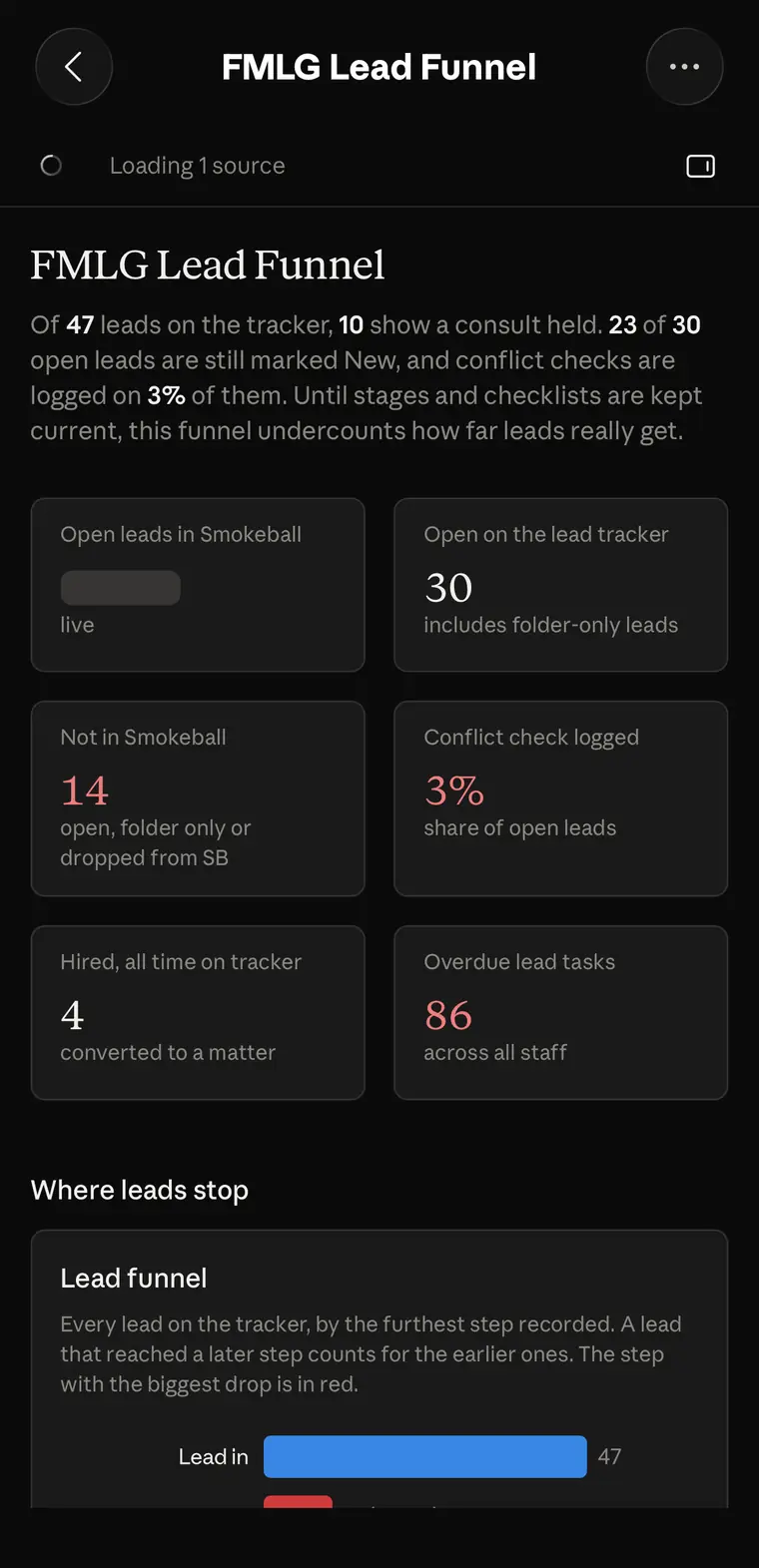
The second is a lead funnel. It tracks every prospective client from first contact through hiring: how many leads are open, how many had a consultation, how many converted, and — the uncomfortable part — where they stall. Notice that this dashboard even calls out its own data-quality problem: when staff don’t keep stages current, it says so. A good dashboard doesn’t flatter you. It tells you where the follow-up is falling through.
The third is a revenue tracker. Monthly revenue stacked by income category, what payment processing actually costs, money arriving outside the main account that still needs to be reconciled, and upcoming payments. Every owner knows the alternative: five browser tabs, a bank login, a processor report, and a spreadsheet that was accurate three weeks ago.
What can a law firm track on a dashboard?
More than you’d think. Work in progress and accounts receivable. Billable hours against targets. Lead sources and conversion rates. Marketing analytics. Task and deadline compliance across the team. Matter counts by stage and practice area. Staff workload. Profitability by matter type. If a number lives in a report you keep meaning to run, it can live on a dashboard you simply look at.
One honest note: as of today, the difference between a dashboard-type artifact and a traditional artifact is modest. But watching how the features are building out, data-heavy work is clearly headed to dashboards. That’s our read as of October 2026, and it’s why we made the move early.
Docs: the living document
Every lawyer knows version hell. A marital settlement agreement goes through eleven rounds. A purchase and sale agreement collects edits from three people. Somewhere in the inbox there’s a file called FINAL-v12-REVISED, and nobody is fully certain it’s the current one.
The Doc type exists for exactly this. Instead of saving version after version and emailing copies around, you get one living document. When terms change, the document changes. Everyone in your firm who opens it sees the current state, because there is only one state. For documents with long lives — settlement agreements, major contracts, firm policies, standard operating procedures — that is a structurally better way to work than a folder of near-identical files.
Two practical cautions, because we’re lawyers. First, a living document is a drafting workspace, not your document management system — your firm’s system of record still holds the official versions, and anything headed to a court goes through your normal review and filing process. Second, apply the same confidentiality judgment you’d apply anywhere else before putting client matter content into any tool. Those two habits cost nothing and keep you out of trouble.
Slides: decks without the all-nighter
The third type is Slides, and it does what the name says: presentation decks as artifacts. Ask Claude to build a deck from your materials — a CLE presentation from your outline, a client education deck explaining what to expect in mediation, a talk for a bar association lunch, a training for your staff — and you get editable slides instead of a blank PowerPoint and a lost evening.
For a firm owner, the quiet win here is consistency. Once your firm’s branding and standard content exist, every deck starts from substance instead of from scratch.
How to actually start
Don’t try to dashboard your whole firm in a weekend. Pick one set of numbers you already check every week — your open leads, your WIP, your overdue tasks. Export or gather that data the way you normally would, give it to Claude, and ask for a dashboard that answers the three questions you actually ask about it. Look at it for a week. Then ask Claude to change what isn’t earning its place. The second version is always better than the first, and the third is usually the one you keep.
The same goes for Docs: take one document that’s currently living in version hell and move it. You’ll know within a round of edits whether the living-document approach fits how your team works.
And through all of it, keep the lawyer habits on: no client-identifying information where it doesn’t belong, and your judgment — not the tool’s — decides what’s final.
See it built live.
Everything in this post came from real firm work, and the fastest way to understand it is to watch it happen. We build dashboards, living documents, and firm systems on screen every week at our free Open Office Hours — Fridays 12–1 PM ET on Zoom, open to any lawyer or paralegal, no registration and no pitch.
Join free office hoursThe screenshots in this post are working dashboards from Family Matters Law Group and Legal Authority Lab. Dollar figures and personal names are masked; no client information appears in any of them. This post is technology education for attorneys and law firms. It is not legal advice and does not create an attorney-client relationship.